


Bootwitch CLI Scaffold — Architecture
There are two layers: the toolkit that creates a project, and the project it leaves you with.
README · ARCHITECTURE · TECHNICAL · source
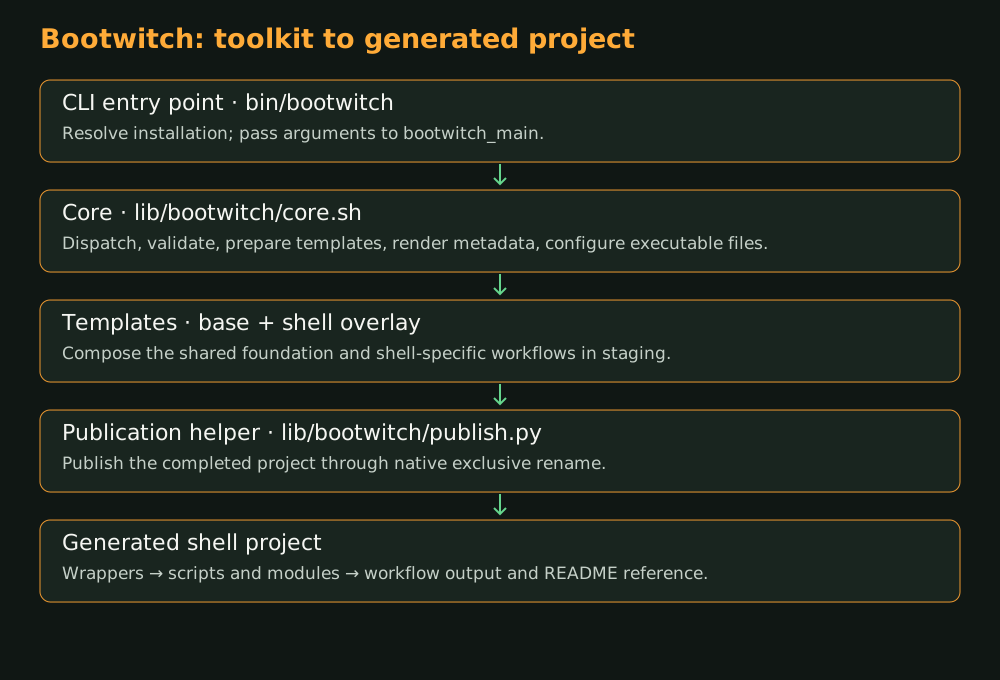 Bootwitch toolkit and generated project
The toolkit
| Piece | What it does |
|---|---|
bin/bootwitch | Finds the installation and starts the dispatcher |
lib/bootwitch/core.sh | Handles commands, prepares templates, and guides project creation |
lib/bootwitch/config.sh | Reads the project's metadata fields |
lib/bootwitch/publish.py | Gives a prepared project its final directory name |
templates/base/ | Supplies the common starting files |
templates/shell/ | Adds the shell workflow, wrappers, modules, tests, and documentation builder |
Creating a project
The direct init command and guided summon setup follow the same path. Bootwitch checks the inputs, prepares a directory beside the destination, combines the templates, fills in project information, and sets the executable permissions. It can initialize local Git as part of that preparation.
Then the publication helper renames the completed directory to its final name. If that final step needs attention, the prepared project remains available and the tool reports where it is. The technical page explains the write behavior in more detail.
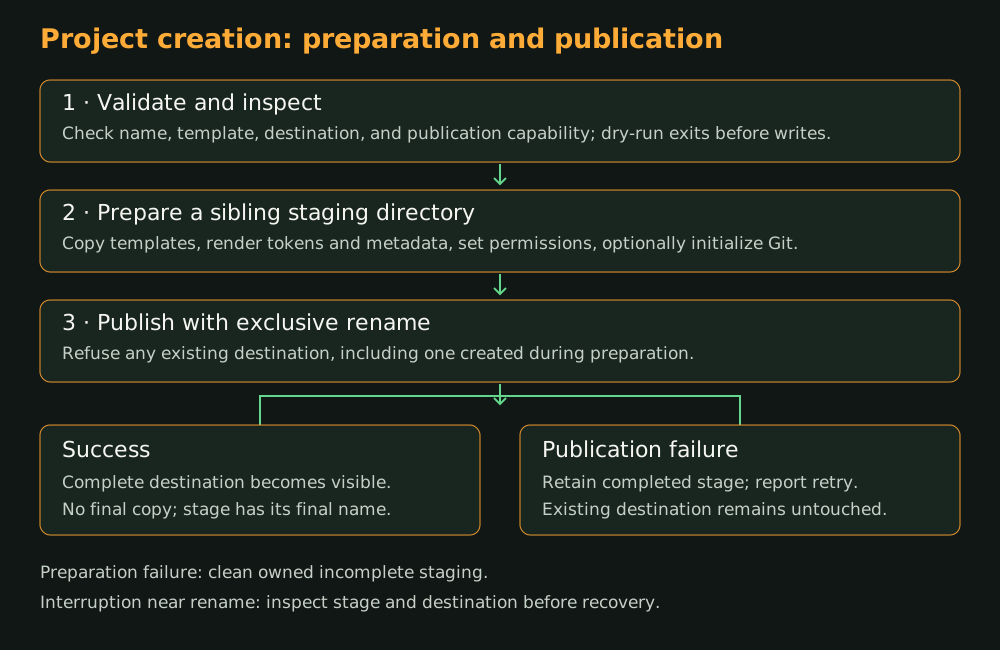 Bootwitch project creation flow
Inside the generated project
| Folder | What you'll find |
|---|---|
wrappers/ | Friendly entry points, including the greeting and README builder |
scripts/ | Workflows such as new-script generation |
modules/ | Shared path, logging, platform, permission, and documentation behavior |
src/ | The starter application script |
tests/ | Checks for the generated project |
.bootwitch/ | Project metadata and the reusable script template |
The generated project can run on its own. Its path helpers locate the project, and its wrappers lead into the scripts and modules that do the work.
From a script to its README entry
A new script receives an annotated header. The generator creates it, then calls the README wrapper in a separate Bash process. The documentation module reads the metadata and marked comments, builds the reference, and updates the generated section of the README.
Human-written text stays around that section. If the script is ready but the README refresh needs another try, the tool reports those two outcomes separately.
The source section has excerpts for the entry point, metadata reader, publication helper, and documentation handoff.
Read next
The technical page explains how the toolkit checks its own output. The source section follows the entry point, metadata reader, publication helper, and documentation handoff.